
Deliveries and delivery lists
When an order's pallet labels are printed, the order is under Leveranser (Deliveries). There you gather one or more orders on a delivery list, review it and approve it. The approval marks the orders as delivered.
Before you start
- The order has status Väntar på leverans (Waiting for delivery), see Pallets.
Create a delivery list
Tap Leveranser on the start page, or Leveranslista (Delivery list) after a print.
Green orders are included on the delivery list. Tap an order to remove it or put it back.
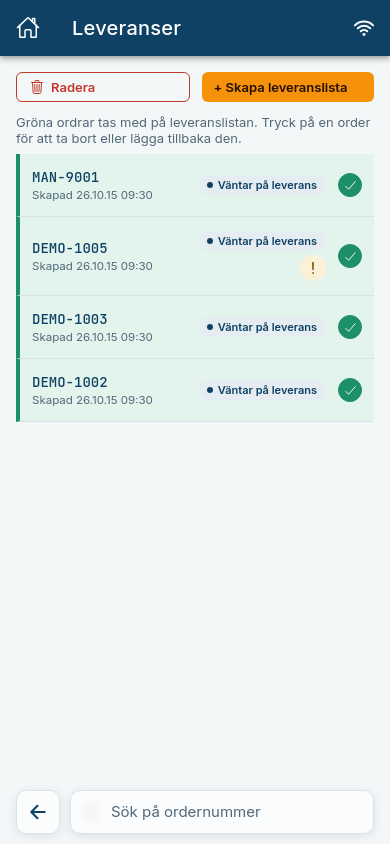
Tap + Skapa leveranslista (+ Create delivery list).
Expected: The view Leveranslista · granska (Delivery list · review) opens. It shows Pallar i leveransen (Pallets in the delivery) per order, and a progress line with the steps Granskad (Reviewed), Utskriven (Printed) and Klar (Done).
Same receiver
All orders on a delivery list must have the same Mottagare (Receiver). Create separate lists for different receivers.
Approve and print
- Check that the pallets are correct.
- Tap Godkänn och skriv ut (Approve and print).
Expected: The page Leveransen är slutförd (The delivery is completed) is shown. Under Dokument (Documents) you see Etiketter (Labels) and Leveranssedel (Delivery note), and the delivery note goes from Printjob skickat (Print job sent) to Printjob behandlat (Print job processed) and Utskriven (Printed). The orders now have status Slutförd and are in History.
After that you can choose Skapa ny order (Create new order) or Tillbaka till start (Back to start).
Print errors
A print error is marked in two places:
- On Leveranser it says "X leveranser har ett utskriftsfel" (X deliveries have a print error).
- On the delivery it says Kunde inte skicka utskriften (Could not send the print job) with the button Testa igen (Try again).
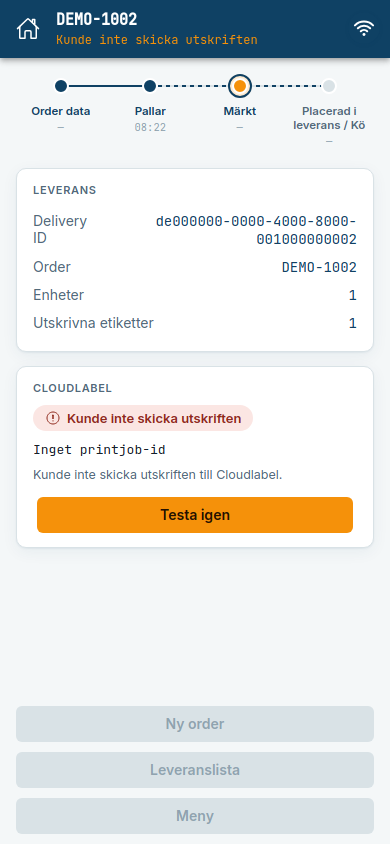
Tap Testa igen. If printing the delivery list itself fails after approval, it says "Leveransen är godkänd, men utskriften kunde inte bekräftas" (The delivery is approved, but the print job could not be confirmed). The delivery is approved anyway, and you print the list again from History.
Common errors
| Message | What to do |
|---|---|
| Inga ordrar väntar på leverans (No orders are waiting for delivery) | Orders end up here when the pallet labels have been printed. |
| En eller flera ordrar kan inte längre läggas på leveranslistan. Gå tillbaka till "Leveranser" och skapa listan igen. (One or more orders can no longer be put on the delivery list.) | An order has changed since you chose it, for example by a colleague. Create the list again. |
| Leveransens id används redan. Gå tillbaka till "Leveranser" och skapa listan igen. (The delivery's id is already in use.) | Create the list again. |
| Kunde inte godkänna leveranslistan. Kontrollera anslutningen och försök igen. (Could not approve the delivery list.) | Check that you are online and try again. |