
Users and invitations
Here you manage who has access to your company: pause, archive, invite and see who has done what. An Admin can also pause and activate, see Users (Admin). Everything else on the page is for TenantAdmin only.
Before you start
- You are signed in as TenantAdmin. Tap the Användare (Users) card on the start page.
The user list
The page Användare has three parts: the user list at the top, Inbjudningar (Invitations) and Aktivitetslogg (Activity log).
Each row in the list has phone number or email, role (User is Operator, Admin or TenantAdmin) and status Aktiv (Active), Pausad (Paused) or Arkiverad (Archived).
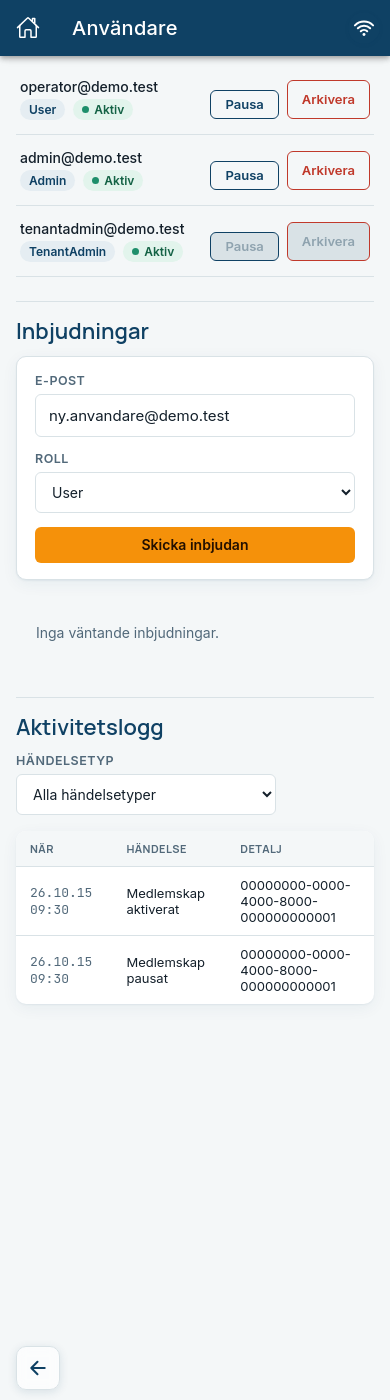
| Button | What it does |
|---|---|
| Pausa / Aktivera (Pause / Activate) | Pauses the user temporarily, or activates again. A paused user cannot sign in. |
| Arkivera / Återaktivera (Archive / Reactivate) | Archives a user who has left, or brings them back. An archived user cannot sign in either. |
A user who is paused or archived gets the same message at sign-in as if the account did not exist: "Ingen användare hittades för den angivna kontaktuppgiften." (No user was found for the contact detail entered.) The user's orders and other data are not affected.
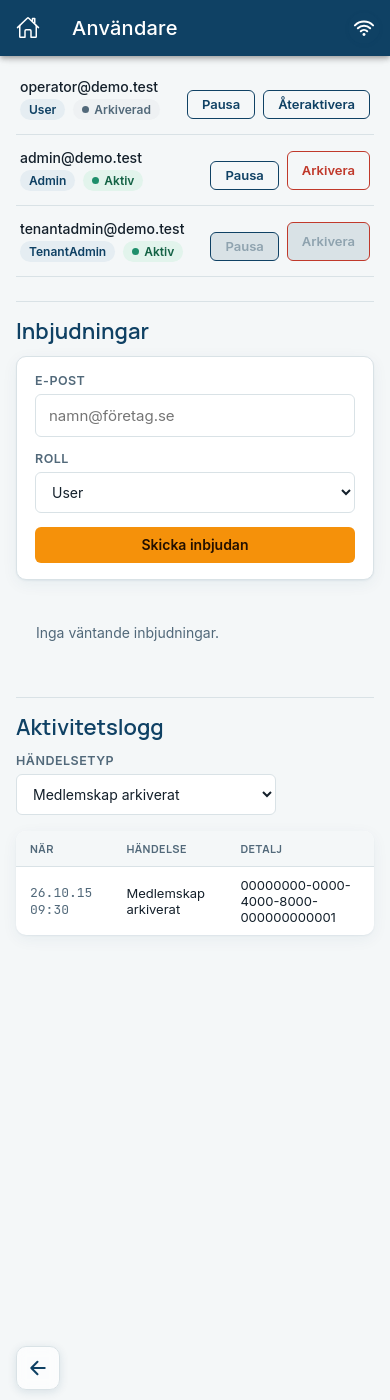
Your own user
The Pausa and Arkivera buttons are grey on your own row. You cannot lock yourself out. If you try anyway, you see "Du kan inte ändra ditt eget medlemskap på det sättet." (You cannot change your own membership that way.)
Invite a user
- Enter the person's email address under Inbjudningar, in the E-post (Email) field.
- Choose Roll (Role): User (Operator), Admin or TenantAdmin.
- Tap Skicka inbjudan (Send invitation).
Expected: The invitation shows in the table of pending invitations, with email, role and when it Går ut (Expires). If there are no pending invitations it says "Inga väntande inbjudningar." (No pending invitations.)
Tap Skicka igen (Send again) on a pending invitation if it has expired or gone missing.
Choose the role with care
TenantAdmin can pause, archive and invite, and change the configuration. Give the role only to those who need it, and Admin to those who should be able to pause users. Most people should be User.
The activity log
The activity log shows who has done what in your company, with the columns När (When), Händelse (Event) and Detalj (Detail). Choose Händelsetyp (Event type) to filter:
- Alla händelsetyper (All event types)
- Tenant skapad, Tenant inaktiverad and Tenant återaktiverad (Tenant created, deactivated, reactivated)
- Användare inbjuden (User invited)
- Medlemskap pausat, Medlemskap aktiverat, Medlemskap arkiverat and Medlemskap återaktiverat (Membership paused, activated, archived, reactivated)
Expected: The rows show the time, the event and an identifier in the Detalj column. If there are no events for the filter it says "Inga händelser för de valda filtren." (No events for the chosen filters.)
Changes you make under Configuration are also written to the log.
Common errors
| Message | What to do |
|---|---|
| E-postadressen tillhör redan ett konto. (The email address already belongs to an account.) | The person already exists. You do not need to invite them. |
| Det finns redan en väntande inbjudan för denna e-postadress. (There is already a pending invitation for this email address.) | Use Skicka igen on the pending invitation. |
| E-postadressen kan inte bjudas in (redan registrerad eller redan inbjuden). (The email address cannot be invited.) | Check the list and the invitations. |
| Ange en e-postadress. (Enter an email address.) | Fill in the E-post field. |
| Inbjudan har redan använts och kan inte skickas igen. (The invitation has already been used and cannot be sent again.) | The person has already accepted. |
| Du kan inte ändra ditt eget medlemskap på det sättet. | Ask another TenantAdmin to make the change. |
| Kunde inte hämta användare / inbjudningar / aktivitetsloggen. Kontrollera anslutningen och försök igen. (Could not fetch users / invitations / the activity log.) | Check that you are online and try again. |
| Kunde inte genomföra ändringen. Kontrollera anslutningen och försök igen. (Could not make the change.) | Nothing changed. Try again. |