
Deviations
A deviation is a note that something does not match on a pallet, for example damaged packaging or the wrong quantity. The deviation stays on the order and can be answered by a colleague.
Before you start
- The order has at least one registered pallet, see Pallets.
See the deviations on an order
Orders with a deviation have an exclamation mark in the order list. Open the order and tap Avvikelser (Deviations).
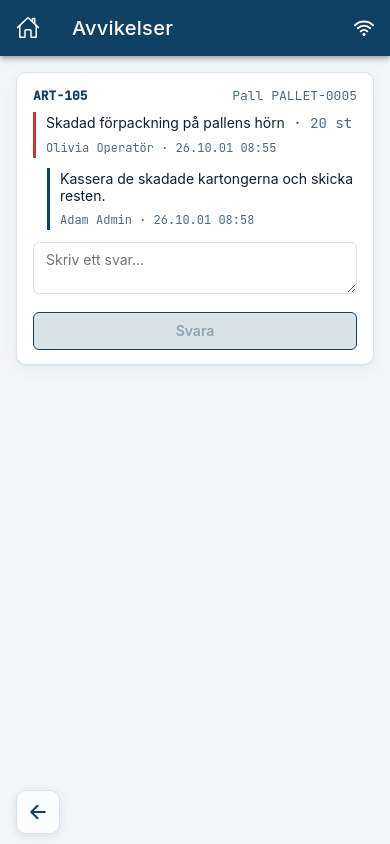
Expected: The page Avvikelser shows each deviation with article and pallet, what is wrong, who wrote it and when, and the replies in the thread. If there are none it says "Inga avvikelser är registrerade på ordern." (No deviations are registered on the order.)
Reply to a deviation
- Open Avvikelser on the order.
- Type in the Skriv ett svar… (Write a reply…) field under the deviation and tap Svara (Reply).
Expected: The reply is added to the thread with your name and the time.
Waiting to sync
A deviation created without a connection is marked Väntar på synk (Waiting to sync). It can only be answered once it has synced.
Create a manual deviation
- Open the order and tap Registrera pallar.
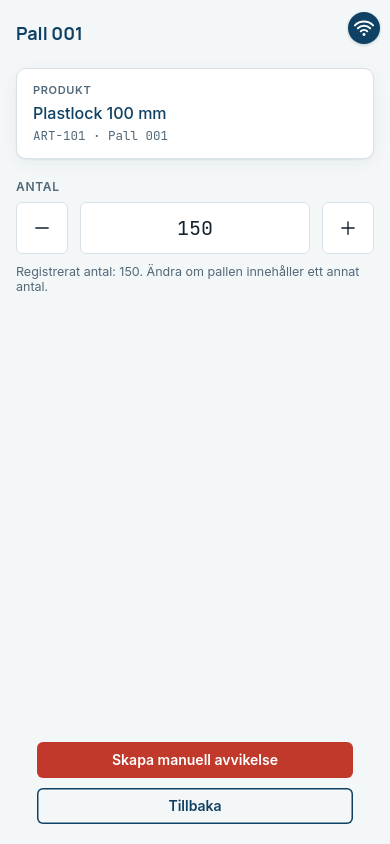
- Tap the pencil on the pallet and then Skapa manuell avvikelse (Create manual deviation).
- Write the deviation, for example
Plast trasig(Plastic broken), and save it with Lägg till avvikelse (Add deviation) and Uppdatera (Update).
Expected: The pallet gets the label Manuell avvikelse (Manual deviation) in the list, and the order is shown with an exclamation mark in the order list.
Can be switched off
Manual deviations are a function your company can have switched off. The button is then missing.
Common errors
| Message | What to do |
|---|---|
| Kunde inte hämta avvikelserna. Kontrollera anslutningen och försök igen. (Could not fetch the deviations.) | Check that you are online and try again. |
| Kunde inte spara svaret. Kontrollera anslutningen och försök igen. (Could not save the reply.) | Try again when you have a connection. The reply was not saved. |