
Drafts and sync queue
Utkast (Drafts) are orders you have saved to continue later. Ej synkat (Not synced, the sync queue) shows changes that have not yet reached the server. Also read Offline and sync.
Drafts
Save a draft
Tap Spara utkast (Save draft) on the page Plockning klar, or Spara i utkast och lämna (Save as draft and leave) when the app asks as you leave the picking page. It needs a connection.
Expected: The order disappears from the order list and is under Utkast.
Continue on a draft
- Tap Utkast on the start page.
- Tap the order.
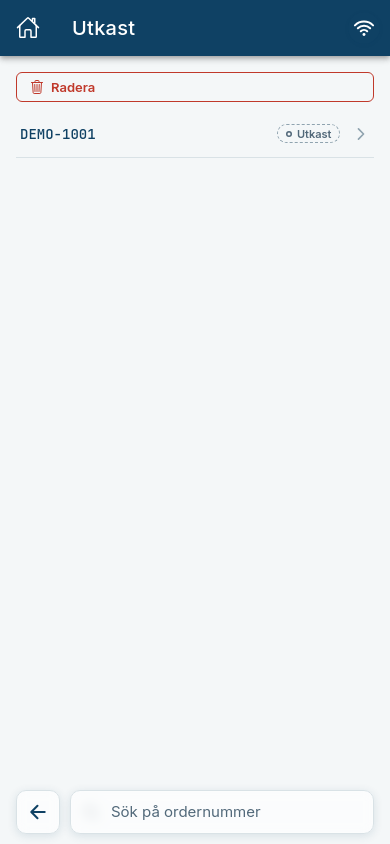
Expected: The order opens with the label Utkast. You can add order data, register more pallets and print the labels. When they are printed, the order is taken out of the drafts by itself.
Delete a draft
Tap Radera (Delete) in the list and mark the drafts to remove. The drafts are hidden.
Ej synkat
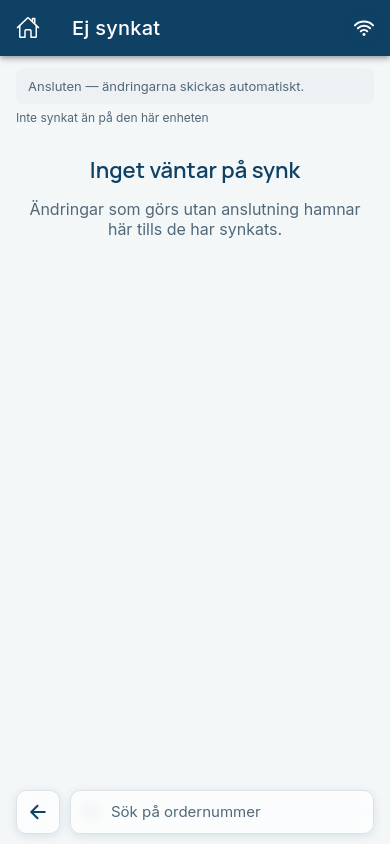
Tap the Ej synkat card on the start page. At the top the connection is shown:
- Ansluten – ändringarna skickas automatiskt. (Connected – changes are sent automatically.)
- Offline – ändringarna skickas när anslutningen är tillbaka. (Offline – changes are sent when the connection is back.)
Below that are Senast synkat (Last synced) and a list per order with changes that are waiting. If the queue is empty it says Inget väntar på synk (Nothing is waiting to sync). Tap Synka nu (Sync now) to send straight away.
Changes that did not get through
A change the server could not accept ends up under Kunde inte synkas (Could not be synced) with time and reason:
| Reason | What it means | What to do |
|---|---|---|
| Ordern har redan levererats och kan inte ändras längre. Ändringen kom inte med. (The order has already been delivered and can no longer be changed.) | Someone completed the order in the meantime. | Make the change again if it is needed, otherwise Ta bort (Remove). |
| Ordernumret finns redan. Ordern skapades inte. (The order number already exists. The order was not created.) | The number was used by another order. | Create the order with a different number. |
| Ordern finns inte på servern, så ändringen kom inte med. (The order does not exist on the server.) | The order has been deleted. | Tap Ta bort. |
Tap Ta bort when you have read the error. The change is not tried again by itself.